
FREE Attendance Tracker for WordPress teams
Simple, accurate employee time clock and attendance tracking for teams that already run operations inside WordPress.
Free to start. Upgrade when GPS, geofence, approvals, payroll export, API, webhooks, and mobile app workflows become important.
What is an attendance tracker?
A smarter way to monitor employee time and attendance
An attendance tracker records when employees start work, take breaks, and finish work. WPChef Tracker brings that process into WordPress with frontend clocking, attendance history, manager visibility, and clean records for review.
Instead of chasing manual notes or scattered spreadsheets, teams can use timestamped attendance data that is easier to verify, approve, export, and retain.
What to look for in an attendance tracker
The features that actually matter
Not all attendance systems are built for operational teams. The features worth looking for are:
- Frontend clocking so employees do not need wp-admin access
- GPS or geofencing to verify location-sensitive attendance
- Rules and explanations for late, early, missing, or overtime actions
- Payroll-ready export so records can move into review and processing
- API and webhooks for connected business workflows

Everything needed for practical WordPress attendance operations.
WPChef Tracker gives teams the employee panel, manager visibility, rules, approvals, location proof, and export workflows needed for daily operations.
Frontend time clock
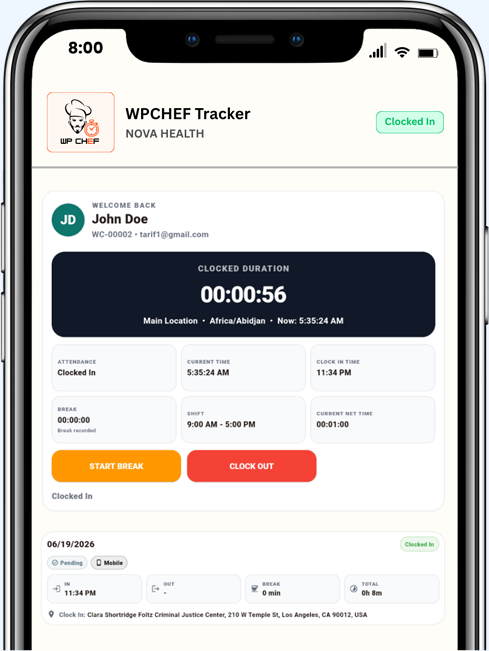
Employees clock in/out and track breaks from a clean frontend panel instead of the WordPress admin area.
Live duration counter
Show active clocked-in time so employees and managers understand current attendance status.
Manager dashboard
Give managers and admins a frontend view for attendance review, approvals, and exports.
GPS location capture
Capture browser geolocation and save Google Maps links with attendance records.
Geofence restriction
Restrict or flag attendance actions by assigned location and allowed radius.
Shift templates
Create reusable shifts with late, early, overtime, and schedule rules.
HR approvals
Require explanations for flagged actions and route exceptions to manager review.
Payroll-ready export
Export cleaner attendance data for payroll review and processing workflows.
REST API + webhooks
Use endpoints and outgoing webhooks for custom integrations and automation.
Verify clock-ins with location proof.
Built for field teams and location-sensitive work
When employees clock in or out, WPChef Tracker can capture GPS through browser geolocation, store a Google Maps link, and validate attendance against the employee’s assigned location.
- GPS location capture
- Google Maps link and map preview support
- Geofence/radius restriction
- Location assignment by employee
Catch attendance exceptions before payroll.
Late, early, missing, and overtime controls
Define shift rules that identify late clock-ins, early clock-outs, missing clock-outs, and overtime. Employees can be required to explain flagged actions before HR or managers approve them.
- Late and early clock rules
- Required employee explanation popups
- Missing clock-out auto detection
- Overtime allowed option and calculation

Your attendance data stays in your own WordPress database.
Full control over employee attendance records
WPChef Tracker is self-hosted. Attendance records, employee actions, GPS references, approvals, settings, and exports remain inside your own WordPress hosting environment instead of being pushed into a separate attendance SaaS by default.
- Own your records in your own hosting database
- Control retention, backup, export, and deletion processes
- Reduce dependency on external attendance platforms
- Keep operational data aligned with your existing WordPress security setup
Self-hosted by design
Clocking records, approvals, and exports stay under your site administration.
One clear flow from clock-in to payroll-ready export.
WPChef Tracker keeps the operational path simple: employee action, rule validation, explanation, approval, and export.

Employee clocks in
The frontend panel records the employee action and captures device, IP, time, and GPS when enabled.
Rules validate the record
Shift, location, late, early, and overtime rules decide whether the record is clean or needs review.
Manager approves exceptions
Explanations and flagged records move into a manager/admin approval process.
Payroll export is ready
Approved attendance can be exported into payroll-ready CSV workflows.
Connect attendance data with the systems your business already uses.
Use exports, REST API, and outgoing webhooks to support reporting, payroll, accounting, and automation workflows.
Google Sheets
Sync or export attendance records into reporting workflows.
ADP and payroll
Prepare payroll-friendly exports for processing routines.
QuickBooks, Xero, FreshBooks
Move approved summaries into accounting-adjacent workflows.
Zapier / Make
Automate follow-ups, alerts, notifications, and connected processes.
Zoho / NetSuite
Support finance and enterprise workflows through exports and API paths.
REST API + Webhooks
Connect attendance and employee data to custom systems.
Attendance control without the heavy workforce-suite feel.
WPChef Tracker focuses on the attendance operations WordPress-based teams actually need.
Start free. Upgrade when attendance becomes operationally important.
Simple single-site pricing because WPChef Tracker already supports multiple employees, managers, departments, locations, and shifts inside one WordPress installation.
WPChef Tracker Free
For businesses that want a basic employee clock-in workflow inside WordPress.
- Clock in/out
- Break tracking
- Frontend employee panel
- Basic reports
- CSV export
WPChef Tracker Pro
For serious attendance operations with GPS proof, rules, approvals, export, API, and webhooks.
- GPS + Google Maps link
- Geofence/radius restriction
- Late/early/overtime rules
- HR approval workflow
- Payroll-ready export
or $19.99/month
Pro + Mobile App
For mobile-first field attendance with app login, GPS clocking, history, and push-ready workflows.
- Everything in Pro
- Employee mobile login
- Live mobile clock tracker
- GPS clock in/out
- Background GPS while clocked in
or $49.99/month
Integration Hub
Connect attendance data to Google Sheets, ADP, QuickBooks, Zapier/Make, Xero, Zoho, NetSuite, API, and webhook workflows.
or $9.99/month
Face Recognition
Optional mobile identity verification for businesses that need stronger employee verification.
or $19.99/month
Questions buyers ask before they choose WPChef Tracker Pro.
Does WPChef Tracker capture GPS location?
Yes. Pro can capture browser geolocation, save a Google Maps link, and use map preview/location settings where configured.
Can I restrict clock-in by location?
Yes. Geofence/radius rules can validate attendance against the assigned location.
Can employees explain early or late actions?
Yes. You can require explanations for flagged early, late, missing, or exception-based attendance actions.
Does it support payroll export?
Yes. Manager/admin users can export payroll-ready CSV records for review and processing.
Is the data self-hosted?
Yes. WPChef Tracker stores operational attendance data in your own WordPress hosting environment.
Does it support API and webhooks?
Yes. Pro includes REST API and outgoing webhook options for connected workflows.
Turn WordPress into a professional attendance command center.
Start with WPChef Tracker Free, then upgrade to Pro for GPS, geofence, shifts, explanations, approvals, payroll exports, API, webhooks, privacy control, and integrations.